
Asistencia vs Control de Tiempo: ¿Cuál Necesitas?
Estos términos se usan indistintamente pero resuelven problemas diferentes. Así determinas qué sistema necesita tu negocio — o si necesitas ambos.
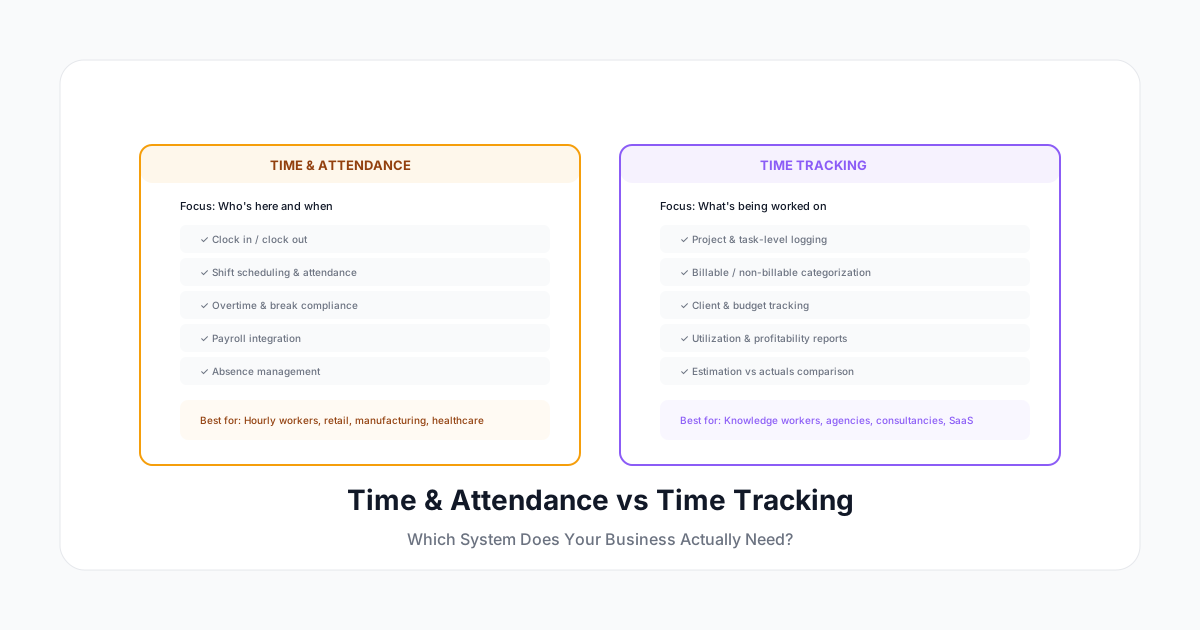
Estos dos términos se usan indistintamente, pero resuelven problemas completamente diferentes. Comprar el equivocado — o intentar usar un sistema para ambas necesidades — lleva a sobreingeniería para tu situación o a perder funcionalidad crítica.
Time and attendance (T&A) responde: "¿Quién se presentó y cuándo?" El registro de tiempo responde: "¿En qué se trabajó y por cuánto tiempo?" Ambos tratan con horas. Pero la intención, los datos y las decisiones de negocio que apoyan son completamente diferentes.
Aquí te explicamos cómo determinar cuál necesitas — o si necesitas ambos.
La Diferencia Fundamental
Time and Attendance (Asistencia)
Propósito: Asegurar que los empleados trabajen sus turnos programados y se les pague correctamente.
Responde la pregunta: "¿Sarah trabajó su turno de 8 horas el martes?"
Datos centrales:
- Hora de entrada
- Hora de salida
- Duración de descansos
- Total de horas trabajadas
- Patrones de asistencia (tardanzas, ausencias)
- Adherencia al horario
Decisiones de negocio que soporta:
- Cálculo de nómina
- Cumplimiento de leyes laborales (tiempo extra, descansos)
- Gestión de asistencia
- Optimización de horarios
- Costo de mano de obra por departamento
Registro de Tiempo
Propósito: Entender cómo las horas de trabajo se asignan entre proyectos, clientes y actividades.
Responde la pregunta: "¿Cómo distribuyó Sarah sus 8 horas el martes?"
Datos centrales:
- Asignación de proyecto/cliente por hora
- Tipo de actividad (diseño, desarrollo, reuniones, admin)
- Categorización facturable vs no facturable
- Detalle a nivel de tarea y descripciones
- Consumo de presupuesto por proyecto
Decisiones de negocio que soporta:
- Facturación a clientes
- Rentabilidad de proyectos
- Asignación de recursos
- Análisis de utilización
- Planificación de capacidad
- Estrategia de precios
¿Cuál Necesitas?
Necesitas Time & Attendance Si:
- Tienes trabajadores por hora que fichan entrada y salida
- Necesitas asegurar cumplimiento de turnos (¿trabajaron sus horas programadas?)
- Tu preocupación principal es la precisión de nómina y cumplimiento de leyes laborales
- Tienes ubicaciones físicas donde se requiere presencia
- Manejas tiempo extra, diferenciales de turno, o cumplimiento de descansos
- Tu industria: manufactura, retail, hospitalidad, salud, servicio de alimentos
Necesitas Registro de Tiempo Si:
- Tienes trabajadores del conocimiento asalariados trabajando en múltiples proyectos
- Facturas a clientes por tiempo dedicado (por hora o necesitas datos para pricing por valor)
- Necesitas saber la rentabilidad de proyectos y estado del presupuesto
- Quieres entender la utilización (qué % del tiempo es productivo/facturable)
- Tu gente trabaja en múltiples cosas por día y necesitas el desglose
- Tu industria: agencias, consultoría, firmas legales, servicios de TI, estudios de diseño
Necesitas Ambos Si:
- Tienes fuerza laboral mixta (por hora + asalariados, campo + oficina)
- Necesitas cumplimiento de nómina Y costeo de proyectos
- Facturas a clientes Y tienes personal por turnos
- Eres una firma de servicios profesionales con empleados no exentos
- Necesitas datos de asistencia para operaciones y datos de proyecto para facturación
Comparación de Funcionalidades
| Funcionalidad | Time & Attendance | Registro de Tiempo |
|---|---|---|
| Fichar entrada/salida | ✅ Core | Opcional |
| Programación de turnos | ✅ Core | ❌ No relevante |
| Seguimiento de descansos | ✅ Core | Opcional |
| Cálculo de tiempo extra | ✅ Core | Depende |
| Asignación de proyecto/cliente | ❌ No relevante | ✅ Core |
| Facturable/no facturable | ❌ No relevante | ✅ Core |
| Descripciones de actividad | ❌ No necesario | ✅ Core |
| Seguimiento de presupuesto | ❌ No relevante | ✅ Core |
| Reportes de utilización | ❌ No relevante | ✅ Core |
| Reportes de asistencia | ✅ Core | ❌ No relevante |
| GPS/geofencing | Común | A veces |
| Login biométrico | Común | Raro |
| Integración con nómina | ✅ Siempre | A veces |
| Integración con facturación | ❌ Rara vez | ✅ Frecuente |
| Cronómetro/stopwatch | ❌ No necesario | ✅ Core |
| Integración con calendario | ❌ No típico | ✅ Core |
Errores Comunes
Error 1: Usar Software de T&A para Seguimiento de Proyectos
Compras un sistema de reloj checador porque maneja bien la nómina. Luego intentas rastrear proyectos en él. El problema: los sistemas de T&A no piensan en "proyectos" — piensan en "turnos." Terminas con:
- Soluciones rebuscadas (usando "departamento" como proxy de proyecto)
- Sin capacidad de seguimiento de presupuesto
- Sin distinción facturable/no facturable
- Reportes diseñados para nómina, no facturación a clientes
Error 2: Usar Registro de Tiempo para Asistencia
Eres una firma consultora así que compras registro de tiempo por proyecto. Pero tienes personal junior que es no exento y necesita registros que cumplan con FLSA. El problema: las herramientas de registro de tiempo a menudo no tienen:
- Enforcement de fichar entrada/salida
- Seguimiento de cumplimiento de descansos
- Auto-cálculo de tiempo extra contra umbrales diarios/semanales
- Reportes de asistencia (tardanzas, ausencias)
- Programación de turnos
Error 3: Comprar Dos Sistemas Separados
Reconoces que necesitas ambos, así que compras un sistema de T&A Y un sistema de registro de tiempo. Ahora tus empleados ingresan tiempo dos veces: una para "cuándo trabajaron" y otra para "en qué trabajaron." Esto duplica la carga administrativa y crea dolores de cabeza de reconciliación (los dos sistemas rara vez concuerdan).
El Enfoque Correcto: Un Sistema que Haga Ambos
Las plataformas modernas de gestión de fuerza laboral pueden manejar ambas necesidades en un solo sistema:
- Capa base: fichar entrada/salida, programación, seguimiento de descansos, nómina (T&A)
- Capa adicional: asignación de proyectos, categorías de facturación, seguimiento de presupuesto (registro de tiempo)
El empleado ficha entrada (datos de T&A capturados), trabaja en proyectos (datos de registro de tiempo capturados), toma descansos (datos de cumplimiento capturados), y ficha salida. Un solo flujo de ingreso, ambas necesidades cubiertas.
Marco de Decisión
Paso 1: Identifica Tu Necesidad Principal
¿Cuál es el problema de negocio que estás resolviendo?
- "Necesitamos nómina precisa" → T&A primero
- "Necesitamos facturar a clientes" → Registro de tiempo primero
- "Necesitamos ambos" → Busca una plataforma unificada
Paso 2: Identifica la Composición de Tu Fuerza Laboral
| Si tu equipo es... | Probablemente necesitas... |
|---|---|
| Todo trabajadores del conocimiento asalariados | Registro de tiempo |
| Todo trabajadores por hora con turnos | Time & attendance |
| Mixto (algunos por hora, algunos asalariados) | Ambos (unificado) |
| Asalariados + contratistas | Registro de tiempo + facturación de contratistas |
| Trabajadores por turnos en proyectos de clientes | Ambos (unificado) |
Paso 3: Evalúa Requisitos de Integración
¿Con qué otros sistemas necesita conectarse?
- Nómina (ADP, Gusto, Paychex) → Fuerte indicador de T&A
- Gestión de proyectos (Jira, Asana, Monday) → Fuerte indicador de registro de tiempo
- Facturación (QuickBooks, Xero, FreshBooks) → Registro de tiempo
- Programación (When I Work, Deputy) → T&A
- ERP (NetSuite, SAP) → Probablemente ambos
Paso 4: Considera el Crecimiento
¿Hacia dónde va tu empresa?
- Creciendo hacia servicios/consultoría → Necesitarás registro de tiempo eventualmente
- Creciendo hacia operaciones por turnos → Necesitarás T&A eventualmente
- Manteniéndose enfocada en trabajo del conocimiento → Registro de tiempo es suficiente
Compra para donde vas, no solo para donde estás hoy.
El Enfoque Híbrido
Para empresas que genuinamente necesitan ambos, así se ve el sistema unificado:
Experiencia del empleado:
- Ficha entrada (captura hora de inicio para T&A)
- Comienza trabajo en Proyecto A (captura asignación de proyecto para registro de tiempo)
- Cambia a Proyecto B (captura cambio de proyecto)
- Toma descanso (captura tiempo de descanso para cumplimiento)
- Continúa trabajo
- Ficha salida (captura hora de fin para T&A)
Resultado en backend:
- Sistema T&A tiene: 8h 15m trabajadas, 30m descanso, dentro del horario
- Registro de tiempo tiene: 4h Proyecto A, 3.5h Proyecto B, 0.75h admin
- Ambas necesidades cubiertas desde un solo flujo de trabajo
Recomendaciones por Industria
| Industria | Necesidad Principal | Por Qué |
|---|---|---|
| Agencia de marketing | Registro de tiempo | Facturación a clientes, utilización |
| Cadena de restaurantes | T&A | Cumplimiento de turnos, nómina |
| Firma legal | Registro de tiempo | Facturación por asunto, tasas de realización |
| Construcción | Ambos | Salario prevaleciente (T&A) + costeo de obra (registro) |
| Salud | Ambos | Cumplimiento de turnos (T&A) + horas de atención al paciente (registro) |
| Empresa SaaS | Registro de tiempo | Asignación de proyectos, planificación de capacidad |
| Retail | T&A | Adherencia al horario, gestión de tiempo extra |
| Firma consultora | Ambos | Cumplimiento de nómina (T&A) + facturación a clientes (registro) |
| Firma contable | Registro de tiempo | Facturación a clientes, utilización |
| Manufactura | T&A | Gestión de turnos, tiempo extra, costo de mano de obra |
La Conclusión
Time and attendance te dice que la gente estuvo aquí. El registro de tiempo te dice qué hicieron. Ambas son necesidades válidas — simplemente son necesidades diferentes.
El peor resultado es tener el equivocado. Un sistema de T&A no le dirá a una agencia qué clientes son rentables. Una herramienta de registro de tiempo no le dirá a una fábrica si la cobertura de turnos es adecuada.
A Human Time conecta ambos mundos: fichar entrada/salida con grado de asistencia para equipos que necesitan cumplimiento, combinado con registro de tiempo a nivel de proyecto para equipos que necesitan asignación y datos de facturación. Un sistema, ambas necesidades cubiertas, cero doble ingreso.
Determina qué pregunta estás intentando responder. Luego elige la herramienta que la responda.