
Controle de Horas para Equipes Assíncronas
Controle de horas tradicional assume que todos trabalham nos mesmos horários. Veja como registrar tempo para equipes async sem lutar contra a cultura remota.
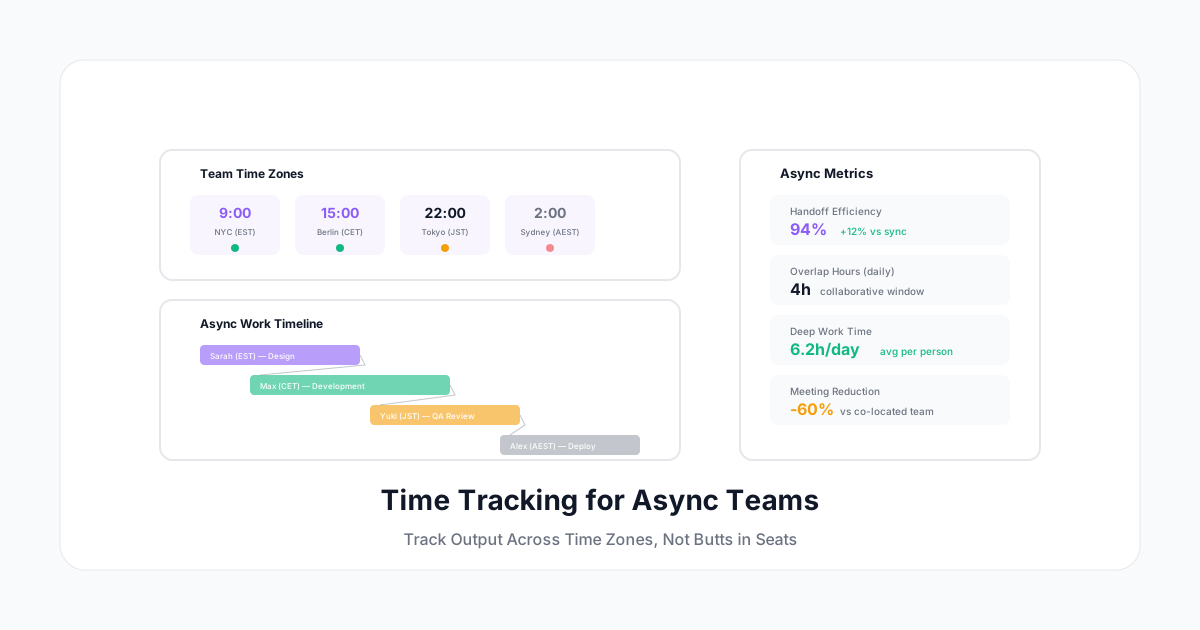
Equipes async-first não trabalham das 9 às 5. Elas trabalham quando são mais produtivas — em fusos horários diferentes, em blocos focados, com entregas acontecendo enquanto um hemisfério dorme e outro acorda.
O controle de horas tradicional assume que todos trabalham no mesmo horário e podem ser medidos da mesma forma. Esse modelo quebra completamente para equipes assíncronas. Você não pode rastrear "presença" quando as pessoas trabalham em horários diferentes por design. Não pode medir "disponibilidade" quando o ponto central é que ninguém precisa estar presente simultaneamente.
Mas você ainda precisa controlar o tempo — para orçamento de projetos, cobrança de clientes, planejamento de capacidade e saber onde o esforço da equipe realmente vai. Veja como fazer isso sem lutar contra sua cultura async.
O Que Torna o Controle de Horas Async Diferente
Sem "Horário Normal" de Trabalho
Em uma equipe síncrona, todos estão online das 9 às 17. Em uma equipe async:
- Um desenvolvedor em Tóquio programa das 8h às 16h JST
- Uma designer em Berlim trabalha das 10h às 18h CET
- Um gerente de produto em Nova York trabalha das 7h às 15h EST
- Eles se sobrepõem por 2-3 horas no máximo
Controle de horas que mede "você trabalhou durante o horário comercial" é sem sentido. O que importa: o trabalho foi feito? Quanto tempo levou? O tempo foi alocado nos projetos certos?
Resultado Acima de Horas
Equipes async frequentemente se importam mais com entregas do que com horas. "Entregar a feature" importa mais do que "registrar 8 horas." Mas mesmo equipes focadas em resultados precisam de controle de horas para:
- Gestão de orçamento (projetos têm limites de horas)
- Cobrança de clientes (até precificação por valor precisa de dados de custo)
- Planejamento de capacidade (podemos assumir outro projeto?)
- Ritmo sustentável (alguém está trabalhando demais?)
O Trabalho Acontece em Blocos
Trabalhadores async não trabalham em blocos contínuos de 8 horas. Eles podem:
- Escrever por 2 horas, depois fazer uma pausa
- Programar por 4 horas, passear com o cachorro, voltar para mais 2
- Fazer trabalho focado de manhã cedo, reuniões ao meio-dia, trabalho profundo novamente à noite
- Trabalhar 10 horas na segunda e 5 horas na quinta (média de 7,5/dia)
Seu sistema de controle de horas precisa acomodar padrões irregulares sem sinalizá-los como problemáticos.
Princípios para Controle de Horas Async
Princípio 1: Rastreie por Projetos, Não por Horários
A unidade fundamental não é "horas trabalhadas hoje" — é "horas alocadas ao Projeto X esta semana."
Pergunta errada: "O Alex trabalhou 8 horas ontem?" Pergunta certa: "Quanta capacidade foi para o Cliente Alpha neste sprint?"
Configure suas categorias de controle de horas em torno de projetos e entregas, não horários de entrada/saída.
Princípio 2: Janelas Flexíveis de Registro
Não exija submissão diária. Trabalhadores async podem registrar tempo:
- Em tempo real (timer rodando enquanto trabalham)
- No final do bloco de foco (após uma sessão de 3 horas de programação)
- No final do dia (revisando o que foi realizado)
- No final da semana (entrada em lote com referência ao calendário/tarefas)
Quanto mais próximo do tempo real, mais preciso — mas forçar submissão diária para pessoas em fusos horários diferentes cria pressão artificial. Semanal é suficiente para a maioria das equipes async.
Princípio 3: Meça o Ritmo Sustentável
Sem os sinais visíveis de fadiga do escritório, o burnout async se instala de forma diferente. Rastreie:
- Total de horas por semana (alguém está consistentemente acima de 45?)
- Trabalho no fim de semana (é ocasional ou habitual?)
- Trabalho noturno (relativo ao fuso horário da pessoa)
- Variação semana a semana (picos repentinos = possível pressão de prazo)
Princípio 4: Confiança como Padrão, Dados como Suporte
Equipes async funcionam com base em confiança. O controle de horas deve complementar essa confiança, não substituí-la. Os dados validam que a carga de trabalho é distribuída de forma justa e sustentável — não policia o comportamento individual.
Configurando o Controle de Horas para Equipes Async
Configuração por Equipe
Para cada membro da equipe:
- Defina o fuso horário local (para relatórios e alertas)
- Defina a janela "principal" (apenas para reuniões de sobreposição, não para rastrear presença)
- Defina expectativas semanais de horas (não diárias)
- Configure alertas relativos ao padrão pessoal (não uma regra global da empresa)
Configuração por Projeto
Para cada projeto:
- Defina orçamento em horas (independente de quem trabalha quando)
- Rastreie horas contribuídas por cada membro da equipe
- Mostre consumo de orçamento em tempo real
- Alerte em limites de orçamento (não em horário do dia)
Configuração de Relatórios
Relatórios devem mostrar:
- Alocação semanal por projeto — Para onde foi o tempo da equipe esta semana?
- Totais individuais semanais — Total de horas por pessoa (dentro da faixa saudável?)
- Taxa de consumo do orçamento — Os projetos estão no caminho certo?
- Eficiência de handoff — Quanto tempo entre uma pessoa terminar e a próxima começar?
Métricas Específicas para Async
Utilização da Sobreposição
Quão bem sua equipe usa a janela colaborativa?
Fórmula: Tempo produtivo de sobreposição ÷ Tempo total de sobreposição disponível
Se sua equipe tem uma janela de sobreposição de 3 horas mas passa 2,5 horas em reuniões, provavelmente não está usando o async de forma efetiva. Boa utilização de sobreposição significa:
- Reuniões são focadas e orientadas a resultados
- Tempo de sobreposição fora de reuniões é reservado para sincs rápidos e decisões
- Trabalho profundo acontece fora da janela de sobreposição
Latência de Handoff
Quanto tempo o trabalho fica parado entre colaboradores?
Fórmula: Tempo desde a conclusão da Pessoa A até o início da Pessoa B × média
Baixa latência de handoff (menos de 4-6 horas) significa que seu sistema async está funcionando bem — a diferença de fuso está sendo aproveitada, não sofrida.
Alta latência de handoff (24+ horas) significa que:
- O trabalho não está sendo comunicado claramente no handoff
- A próxima pessoa não sabe que é sua vez
- Há um gargalo em um fuso horário
Proporção de Trabalho Profundo
A maior vantagem do async: tempo de foco ininterrupto. Meça se você realmente está obtendo isso.
Fórmula: Horas em blocos focados de 2+ horas ÷ Total de horas trabalhadas
Equipes async devem ter proporções de trabalho profundo de 50-70% (vs 25-40% para equipes síncronas). Se a proporção da sua equipe async parece com a de uma equipe síncrona, você provavelmente ainda está esperando muita disponibilidade em tempo real.
Cobertura de Fusos Horários
Para equipes que atendem clientes globais:
Fórmula: Horas do dia com pelo menos um membro da equipe ativo ÷ 24
Uma equipe cobrindo Costa Leste dos EUA + Europa Central + Ásia Oriental cobre 18-20 horas por dia. Isso é uma vantagem competitiva para tempo de resposta ao cliente — mas só se você conseguir provar isso.
Evitando Anti-Padrões Async
Anti-Padrão: Medir Tempo "Online"
Algumas ferramentas rastreiam quando as pessoas estão "ativas" (atividade no teclado, uso de apps, status verde no Slack). Para equipes async, isso é ativamente prejudicial:
- Recompensa "parecer ocupado" no Slack em vez de fazer trabalho profundo
- Pune a pessoa que escreve código brilhante em 3 horas focadas
- Cria pressão para estar "disponível" durante horas que você explicitamente disse serem pessoais
- Mina o ponto central do async (trabalhe quando for produtivo)
Em vez disso: Rastreie tempo por ação explícita (iniciar um timer, registrar uma entrada) — não por vigilância passiva.
Anti-Padrão: Daily Standups em Todos os Fusos Horários
Se seu "standup" exige que alguém acorde às 6h da manhã ou fique até 22h, isso não é async — é infligir horários síncronos em pessoas em fusos inconvenientes.
Em vez disso: Standups assíncronos (atualizações escritas em um canal compartilhado) com controle de horas mostrando o que foi realizado, não quando.
Anti-Padrão: Expectativas Idênticas de Horas
Alguns papéis precisam de menos horas para resultados equivalentes. Um desenvolvedor sênior escrevendo código limpo em 6 horas não deveria ser penalizado em comparação com um júnior gastando 8 horas (mais 2 horas debugando) para a mesma feature.
Em vez disso: Rastreie horas para fins de orçamento/cobrança, mas meça resultado separadamente. Horas informam planejamento de capacidade — não medem qualidade da contribuição.
Ferramentas para Controle de Horas Async
Sua ferramenta precisa lidar com:
| Recurso | Por quê (Específico para Async) |
|---|---|
| Consciência de fuso horário | Relatórios no horário local de cada pessoa |
| Janelas de entrada flexíveis | Sem pressão de prazo para registro diário |
| Organização por projeto | Não por horário |
| Resumos semanais | Revisão em lote vs microgerenciamento diário |
| Notificações assíncronas | Lembretes entregues no horário de trabalho, não às 2h da manhã |
| Visibilidade de carga de trabalho | Gestor vê distribuição da equipe sem monitoramento em tempo real |
| Offline/mobile | Registrar tempo de qualquer lugar, qualquer conectividade |
Fazendo Funcionar na Prática
Acordos de Equipe
Defina expectativas claras desde o início:
- "Rastreamos tempo por projetos semanalmente para fins de orçamento"
- "Meta: 30-35 horas/semana de trabalho em projetos (ajuste para seu papel)"
- "Registre até o final da sua sexta-feira (no seu fuso horário)"
- "Se você está consistentemente acima de 40 horas, vamos redistribuir"
- "Dados de tempo são para planejamento da equipe, não avaliação de desempenho individual"
Checklist do Gestor (Semanal, 15 Minutos)
- Revisar alocação por projeto da equipe — a carga está distribuída de forma justa?
- Verificar totais individuais semanais — alguém consistentemente alto ou baixo?
- Revisar orçamentos de projetos — algo se aproximando do limite?
- Notar padrões de handoff — algum gargalo?
- Fazer follow-up em anomalias (de forma privada, não confrontacional)
Ritmo Individual
Os melhores praticantes de controle de horas async constroem um ritmo pessoal:
- Iniciar timer ao começar trabalho focado
- Registrar reuniões conforme acontecem
- Fim do dia: revisão de 2 minutos (faltou algo?)
- Sexta-feira: confirmar que a semana está completa
- O controle de horas se torna hábito invisível em 2-3 semanas
A Vantagem Async
Quando feito corretamente, equipes async que rastreiam bem o tempo têm dados melhores do que equipes síncronas porque:
- Entradas são mais intencionais (você inicia um timer de propósito)
- Categorias são mais precisas (você sabe no que está trabalhando)
- Trabalho profundo é realmente mensurável (aparece como blocos longos e focados)
- Sinais de burnout são mais claros (estão nos dados, não mascarados pela presença no escritório)
O A Human Time é construído para equipes async-first: lembretes com consciência de fuso horário, registro semanal flexível, organização por projeto e dashboards de equipe que mostram capacidade sem exigir presença simultânea. Porque as melhores equipes trabalham em fusos horários diferentes — e suas ferramentas também devem.
Rastreie o que importa: para onde vai o tempo e se é sustentável. Deixe sua equipe decidir quando.