
Timesheet Automation: Zero-Touch Workflows
The average employee spends 4.5 hours per week on timesheet tasks. Here's how to automate the entire chain from capture to payroll.
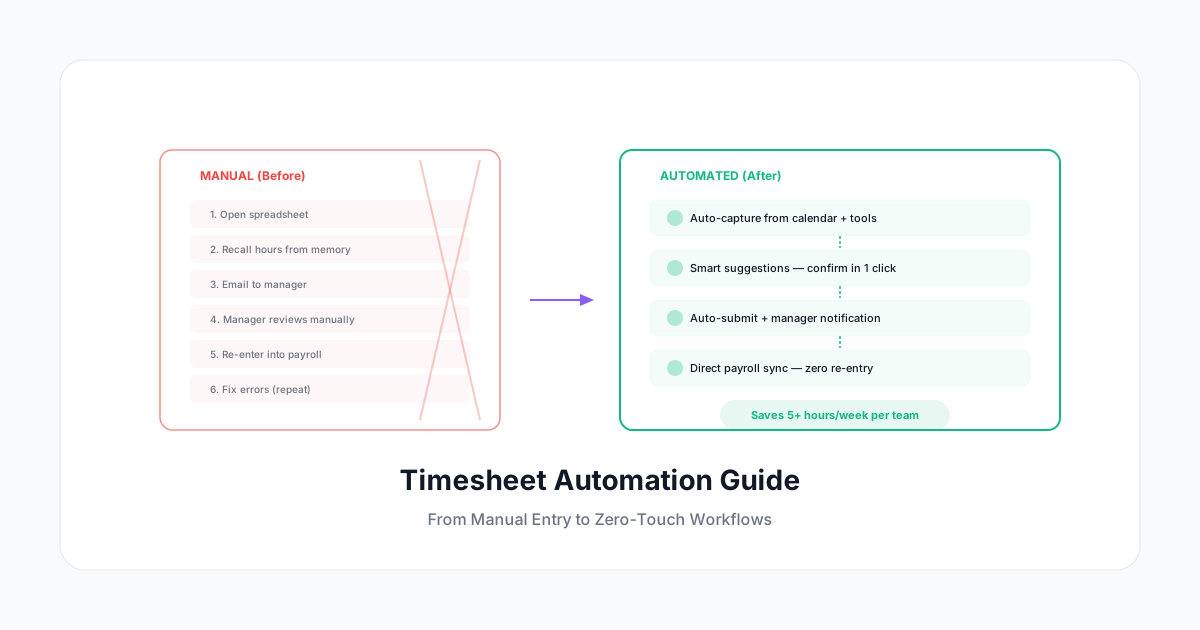
The average employee spends 4.5 hours per week on timesheet-related tasks. For a 50-person company, that's 225 hours per week — nearly 6 full-time positions — devoted to nothing but recording, submitting, approving, and fixing time entries.
That's insane. And it's fixable.
Timesheet automation eliminates manual entry, reduces errors by 80-90%, cuts admin time by 70%, and gives you better data than you ever got from spreadsheets. Here's how to move from manual timesheets to zero-touch workflows in 2026.
What "Timesheet Automation" Actually Means
It doesn't mean removing humans from the process entirely. It means removing the tedious, error-prone, repetitive parts so humans focus on the decisions — not the data entry.
The Automation Spectrum
Level 0: Fully Manual
- Employee fills out a spreadsheet or paper timesheet from memory
- Manager reviews line by line
- Admin re-enters into payroll system
- Errors caught days or weeks later
Level 1: Digital Entry
- Employee enters time in software (instead of paper)
- Some validation (can't submit negative hours)
- Manager approves digitally
- Some payroll integration
Level 2: Assisted Entry
- System suggests time entries based on calendar, tools, and patterns
- Employee confirms or adjusts (one-click)
- Automatic reminders and escalation
- Direct payroll sync
Level 3: Intelligent Automation
- System captures time from multiple sources automatically
- AI categorizes and assigns to projects
- Employee reviews a pre-filled timesheet weekly
- Anomaly detection flags issues
- Zero re-entry from tracking to payroll
Most companies are at Level 0-1. The goal is Level 2-3. The jump from 0 to 2 is where the biggest ROI lives.
Automation Opportunities at Every Stage
Stage 1: Time Capture
Manual: Employee remembers what they did and types it in.
Automated:
- Calendar events → automatic time suggestions ("You had a 1h meeting with Client X — log it?")
- Project tool integration → task time pulled from Jira, Asana, or Monday
- Browser/app tracking → time spent in specific tools associated with projects
- GPS clock-in → arriving at a job site starts the timer
- Smart suggestions → "Based on your pattern, you usually work on Project A on Tuesdays"
Result: 80% of time entries are pre-filled. Employee confirms rather than creates.
Stage 2: Categorization
Manual: Employee picks from dropdown menus. Gets it wrong 10% of the time.
Automated:
- Machine learning assigns categories based on past entries
- Calendar event titles map to projects automatically
- Rule-based assignment (email to X client = Client X project)
- Smart defaults (recurring meetings always go to the same project)
Result: Categorization accuracy goes from 90% to 97%+. Miscategorized entries flagged automatically.
Stage 3: Submission
Manual: Employee remembers to submit by Friday. (40% don't without reminders.)
Automated:
- Auto-submit at end of week if all entries confirmed
- Escalating reminders (gentle → firm → manager notification)
- Mobile push notifications at end of day
- Team dashboards showing submission status
- "Complete my week" one-click action
Result: Submission compliance goes from 60% to 95%+. No more chasing timesheets.
Stage 4: Approval
Manual: Manager reviews every entry for every team member. Takes hours.
Automated:
- Anomaly-only review: manager only sees flagged entries (unusual hours, wrong project, exceeded budget)
- Bulk approval for standard entries
- Auto-approval rules ("entries under 8h/day that match schedule → auto-approve")
- Delegation workflows (when manager is out, approval routes to backup)
Result: Manager approval time drops from 2-4 hours/week to 15-30 minutes/week.
Stage 5: Payroll Processing
Manual: Payroll admin re-enters approved hours into payroll system. Cross-references against schedules. Calculates overtime manually.
Automated:
- Direct sync to payroll software (ADP, Gusto, Paychex, etc.)
- Overtime auto-calculated based on jurisdiction rules
- Shift differentials applied automatically
- PTO deducted from balances automatically
- Exception report generated (not the full data set — just the unusual items)
Result: Payroll processing time drops by 60-80%. Error rate drops by 90%.
Implementation Roadmap
Phase 1: Foundation (Week 1-2)
- Set up time tracking software with your team structure
- Create project/client list matching your billing categories
- Import employee schedules
- Connect calendar integration (Google Calendar, Outlook)
- Set up basic reminders
Quick win: Calendar integration alone pre-fills 30-50% of entries.
Phase 2: Smart Capture (Week 3-4)
- Enable AI suggestions based on patterns
- Set up project management tool integration (Jira, Asana, etc.)
- Configure recurring entry templates
- Create smart rules for common activities
Quick win: Recurring entries (weekly meetings, standing project allocations) generate automatically.
Phase 3: Streamlined Approval (Week 5-6)
- Define auto-approval rules (standard entries below threshold)
- Set up anomaly detection (flag only unusual items)
- Configure manager dashboards (team compliance + flagged items only)
- Train managers on exception-based review
Quick win: Managers go from reviewing 100% of entries to reviewing only 10-15% (the exceptions).
Phase 4: Payroll Sync (Week 7-8)
- Connect time tracking to payroll system
- Configure overtime rules per jurisdiction
- Set up PTO auto-deduction
- Test with a parallel run (compare automated vs manual payroll for one period)
- Go live with automated payroll feed
Quick win: Payroll closes 2-3 days faster. Errors drop immediately.
Automation ROI by Team Size
| Team Size | Manual Time Cost/Year | Automated Cost/Year | Annual Savings |
|---|---|---|---|
| 10 people | $31,200 | $4,800 | $26,400 |
| 25 people | $78,000 | $7,500 | $70,500 |
| 50 people | $156,000 | $12,000 | $144,000 |
| 100 people | $312,000 | $18,000 | $294,000 |
Based on: 4.5h/week per employee for manual process, 0.5h/week automated, $30/hr average cost
Common Automation Concerns (And Reality)
"What if the automation makes mistakes?"
Automation doesn't replace human judgment — it replaces human data entry. The employee still confirms entries, the manager still reviews flagged items, and anomalies still get human attention.
Error rates go DOWN with automation because:
- Entries are captured in real time (not from memory)
- Categorization is consistent (not dependent on which dropdown someone picks)
- Math is calculated by software (not spreadsheet formulas that break)
"My team won't trust automated entries"
Start with suggestions, not auto-fill. Show employees what the system would have entered. Let them confirm or edit for 2-4 weeks. Once they see the suggestions are 90%+ accurate, they'll welcome the automation.
"Our processes are too unique/complex"
Every company thinks their process is uniquely complex. In practice, 90% of time tracking needs fall into standard patterns. The 10% that's truly unique can be handled with custom rules.
If your current process is so complex that it can't be automated, that's a sign the process needs simplifying — not that automation won't work.
"What about compliance? We need manual records."
Automated records are MORE compliant than manual ones because:
- Every entry has a timestamp
- Every edit has an audit trail
- Overtime is calculated correctly every time
- Break compliance is tracked systematically
- Nothing falls through the cracks
Auditors prefer clean, consistent digital records over error-prone spreadsheets.
What to Look for in Automation Tools
Must-Have Features
- ✅ Calendar integration (Google, Outlook, Apple)
- ✅ Project management sync (Jira, Asana, Monday, Linear)
- ✅ AI suggestions based on patterns
- ✅ One-click confirmation (not re-entry)
- ✅ Automated reminders with escalation
- ✅ Exception-based approval workflow
- ✅ Direct payroll integration
- ✅ Mobile app with push notifications
Nice-to-Have Features
- 🟡 Natural language entry ("3h client call Acme Corp")
- 🟡 Slack/Teams integration (log time without leaving your chat tool)
- 🟡 Smart scheduling (suggest blocks based on upcoming deadlines)
- 🟡 Anomaly detection with explanations
- 🟡 Predictive entry (pre-fill tomorrow based on patterns)
Red Flags
- 🚩 No API (can't connect to your other tools)
- 🚩 Manual export required for payroll
- 🚩 No mobile app (or a bad one)
- 🚩 Complex setup requiring consultants
- 🚩 No bulk approval (manager reviews entry by entry)
Start Here
You don't need to automate everything at once. Pick the highest-friction step in your current process and automate that first:
- If compliance is your problem: Start with automated reminders and escalation
- If accuracy is your problem: Start with calendar integration and suggestions
- If payroll is your problem: Start with system integration and auto-calculation
- If manager time is your problem: Start with exception-based approval
A Human Time automates the entire chain: smart suggestions from your calendar, one-click confirmation, automatic reminders, exception-based approval for managers, and direct payroll sync. Most teams go from Level 0-1 to Level 2-3 in under two weeks.
The goal is zero time spent thinking about timesheets. Just confirm what the system already knows, review the exceptions, and move on with your actual work.