
Stop Project Budget Overruns With Time Data
Most projects don't blow their budget on day one — they bleed out slowly. Here's how to build an early warning system using real-time time tracking.
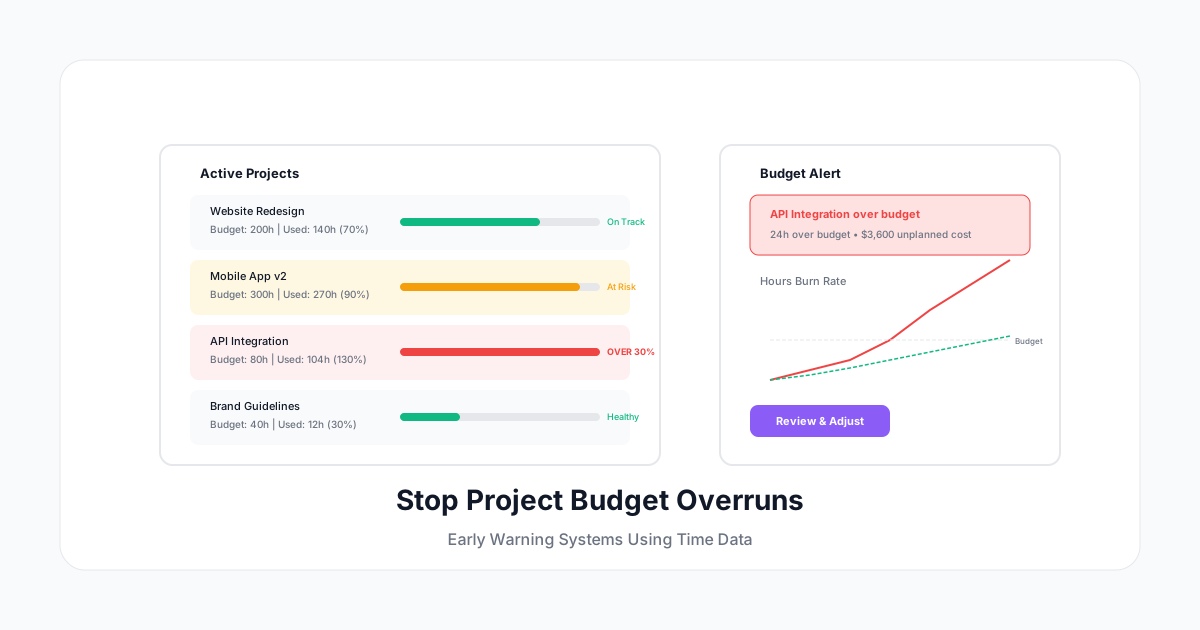
Most projects don't blow their budget on day one. They bleed out slowly — an hour here, a "quick addition" there, a scope expansion that nobody thought to re-estimate. By the time someone notices, the project is 30% over budget and there's no way to recover the cost.
The fix isn't better estimates (though those help). It's real-time budget tracking using time data. When you see a project trending over budget at 50% completion, you have options. When you discover it at 95% completion, you have a loss.
Here's how to build an early warning system that catches budget overruns before they become financial problems.
Why Projects Run Over Budget
Reason 1: Estimates Are Optimistic
Most project estimates are based on best-case scenarios. The developer thinks it'll take 20 hours because they're imagining zero interruptions, zero bugs, and zero changes. Reality adds 40-60% to that.
The pattern: Projects estimated at 100 hours consistently take 140-160 hours. Teams learn to pad estimates, but clients push back on padded numbers, so the padding gets removed — and the overruns continue.
Reason 2: Scope Creep Is Invisible
"Can we also..." "What about..." "One more small thing..."
Each individual request seems trivial. In aggregate, they add 20-50% to a project's scope without any corresponding budget increase. Without time tracking against the original budget, nobody knows the creep is happening until the budget is gone.
Reason 3: Nobody's Watching the Numbers in Real Time
Most companies do budget reconciliation monthly or at project completion. That's like checking your bank balance once a month — by the time you notice the problem, the money's already spent.
Reason 4: The Wrong Work Gets Priority
Not all project work is equal. Some tasks deliver client value; others are internal rework, miscommunication cleanup, or technical debt. Without time categorization, you can't see that 30% of project hours go to rework — which means the actual productive capacity is 30% lower than budgeted.
Building a Budget Early Warning System
Layer 1: Budget Allocation (Before the Project Starts)
Before tracking time, define the budget in hours:
Project: Website Redesign
Total Budget: 200 hours

Allocation:
├── Discovery & Planning: 20h (10%)
├── Design: 60h (30%)
├── Development: 80h (40%)
├── Testing & QA: 25h (12.5%)
├── Project Management: 15h (7.5%)
└── Buffer: Built into each phase (+15%)
Key point: Budget in hours, not just dollars. Dollars hide the real issue (time consumption). Hours make it visible.
Layer 2: Real-Time Tracking (During the Project)
Every team member tracks time to the project, categorized by phase:
- Timer running = hours consumed = budget decreasing
- Daily updates to project burn rate
- Percentage complete vs percentage of budget consumed
The critical metric: If you've consumed 60% of the budget but completed only 40% of the work, you're heading for a 50% overrun. This is obvious at 60% — it's too late at 90%.
Layer 3: Threshold Alerts (Automated)
Set alerts at key thresholds:
| Budget Consumed | Status | Action |
|---|---|---|
| 50% consumed, 50%+ complete | Green | On track, continue |
| 50% consumed, 30-49% complete | Yellow | Review scope and pace |
| 75% consumed, <60% complete | Orange | Immediate stakeholder discussion |
| 90% consumed, <75% complete | Red | Stop, reassess, get approval for overage |
These alerts should go to the project manager AND the client/stakeholder. Surprises kill client relationships.
Layer 4: Weekly Budget Reviews (5 Minutes Per Project)
Every week, each active project gets a quick health check:
- Hours consumed this week
- Total hours consumed vs total budget
- Estimated hours remaining (based on tasks left)
- Projected total vs approved budget
- Any scope changes requested this week
This takes 5 minutes per project. It prevents 50 hours of crisis management when a project goes over.
Handling Common Budget Threats
Scope Creep
Prevention: Log every out-of-scope request as a separate time entry. Tag it "out of scope" or "change request."
When it happens: Show the client the tracked hours: "This week's change requests added 8 hours to the project. Here's the breakdown. Would you like to approve an expanded budget, or should we defer these to phase 2?"
Time data turns a difficult conversation into a factual one.
Technical Complexity Surprises
Sometimes a feature is harder than estimated. The authentication integration that was "20 hours" turns into 45 because of undocumented API quirks.
Early detection: Track time per task. When any single task exceeds 150% of its estimate, flag it immediately. Don't wait until the phase is over.
The conversation: "The auth integration is trending at 2x estimate due to API complexity. We have two options: reduce scope elsewhere to stay on budget, or approve an additional 25 hours."
Rework and Revisions
Revisions are normal. Excessive revisions signal a communication or process problem.
Track revisions separately. If "Design — Revisions" is 40% of total design hours, something is wrong upstream (unclear brief, missing stakeholder alignment, scope not locked before design starts).
Benchmark: Revisions should be 15-25% of phase hours. Above 30%, there's a process problem worth fixing.
Meeting and Communication Overhead
Project management and communication should be 10-15% of total project hours. If it's 25-30%, the project is too fragmented, has too many stakeholders, or lacks clear decision-making authority.
Track project management time. If it's exceeding budget, the fix isn't "have fewer meetings" — it's "get decisions made faster."
Client Communication Best Practices
Transparent Budget Reporting
Send clients a simple budget status with every invoice or weekly update:
Project Status: Website Redesign
Budget: 200 hours
Used: 124 hours (62%)
Remaining: 76 hours (38%)
Estimated to complete: 70 hours
Status: ON TRACK (6-hour buffer remaining)
This builds trust. Clients who see regular updates rarely feel surprised by budget discussions.
The Early Warning Conversation
When a project enters yellow status:
Script: "I want to give you a heads-up. We've used 50% of the budget and we're about 35% through the deliverables. The primary driver is [specific reason: additional revision rounds / technical complexity / scope additions]. Here are our options:
- Reduce scope to stay within budget (here's what we'd defer)
- Extend the budget by X hours (here's what that costs)
- Adjust timeline to allow a different approach (here's the new date)
Which would you prefer?"
Having this conversation at 50% budget consumed gives everyone options. Having it at 95% gives nobody options.
Change Order Protocol
For any scope addition after project kick-off:
- Log the request
- Estimate the additional hours
- Get written approval before starting
- Track the change order hours separately
- Invoice separately or add to the next milestone
The rule: Nothing new starts without a tracked, approved change order. This alone prevents most budget blowouts.
Tools and Metrics
Essential Project Budget Metrics
| Metric | Formula | Healthy Range |
|---|---|---|
| Budget Burn Rate | Hours used ÷ Calendar days elapsed | Below planned rate |
| Cost Performance Index | Budgeted cost ÷ Actual cost | Above 1.0 |
| Estimate at Completion | Budget ÷ CPI | Below approved budget |
| Scope Creep % | Out-of-scope hours ÷ Total hours | Below 10% |
| Rework % | Revision hours ÷ Phase hours | Below 25% |
What to Look for in a Tool
- Per-project budgets with real-time burn tracking
- Phase/category breakdown (not just total hours)
- Threshold alerts (configurable by project)
- Client-facing reports (exportable, clean, professional)
- Forecasting based on current burn rate
- Historical comparisons (this project vs similar past projects)
Prevention Is Cheaper Than Recovery
A project that runs 30% over budget doesn't just cost 30% more in labor. It costs:
- Client relationship damage (reduced trust, harder negotiations next time)
- Team morale hit (nobody likes working on a "failing" project)
- Opportunity cost (those extra hours could have been billed elsewhere)
- Margin compression (if you eat the cost, your profit disappears)
Preventing a 30% overrun on a 200-hour project saves: 60 hours × billing rate. At $150/hour, that's $9,000 — from one project.
Multiply that by your annual project volume and the case for budget tracking becomes overwhelming.
Getting Started
-
List your active projects. How many have defined hour budgets? (If the answer is "none," start there.)
-
Set up time tracking per project. Every hour goes somewhere. No "general" or "other" buckets.
-
Define your thresholds. When should you get a warning? 50% budget / 40% complete is a common starting trigger.
-
Review weekly. 5 minutes per project. Non-negotiable.
-
Communicate with clients. Start including budget status in your regular updates.
A Human Time makes project budget tracking visual and actionable: set budgets, track time against them in real time, get alerts before overruns happen, and share beautiful progress reports with clients. Because the best time to catch a budget problem is before it becomes one.
Stop discovering budget overruns at the end. Start seeing them in the middle — when you can still do something about it.